 LifeTrellis
Quick notes or connected family plans?
Google Keep is a lightweight place for ideas and checklists. LifeTrellis turns household planning into connected tools rather than a collection of notes.
WHERE GOOGLE KEEP SHINES
A different focus
Google Keep is useful for quick capture, colour-coded notes and simple shared checklists. Its close connection to Google’s ecosystem makes it convenient for everyday reminders and ideas.
WHERE LIFETRELLIS FITS
Your household, connected
Start with family tools already in place: a shared schedule, errands, shopping, meals and budgeting, alongside personal goals and habits. Explore the free demo and check pricing for feature availability.
The differences, at a glance
A comparison by LifeTrellis · Availability varies by plan and setup · Not an import or migration service
| Feature | LifeTrellis | Google Keep |
|---|---|---|
| Notes | Organized notebooks and notes | Quick notes, labels and colours |
| Shared lists | Multiple shared shopping lists | Collaborative notes and checklists |
| Task organization | Errands, subtasks, projects and recurrence | Checklist-based organization |
| Family schedule | Shared calendar and task time blocks | Use Google Calendar separately for scheduling |
| Budget and savings | Dedicated shared financial tools | Can write budgets in notes |
| Meals and habits | Dedicated meal planner and habit tracking | Can keep meal ideas and routine checklists |
Check current Google Keep features on the official website.
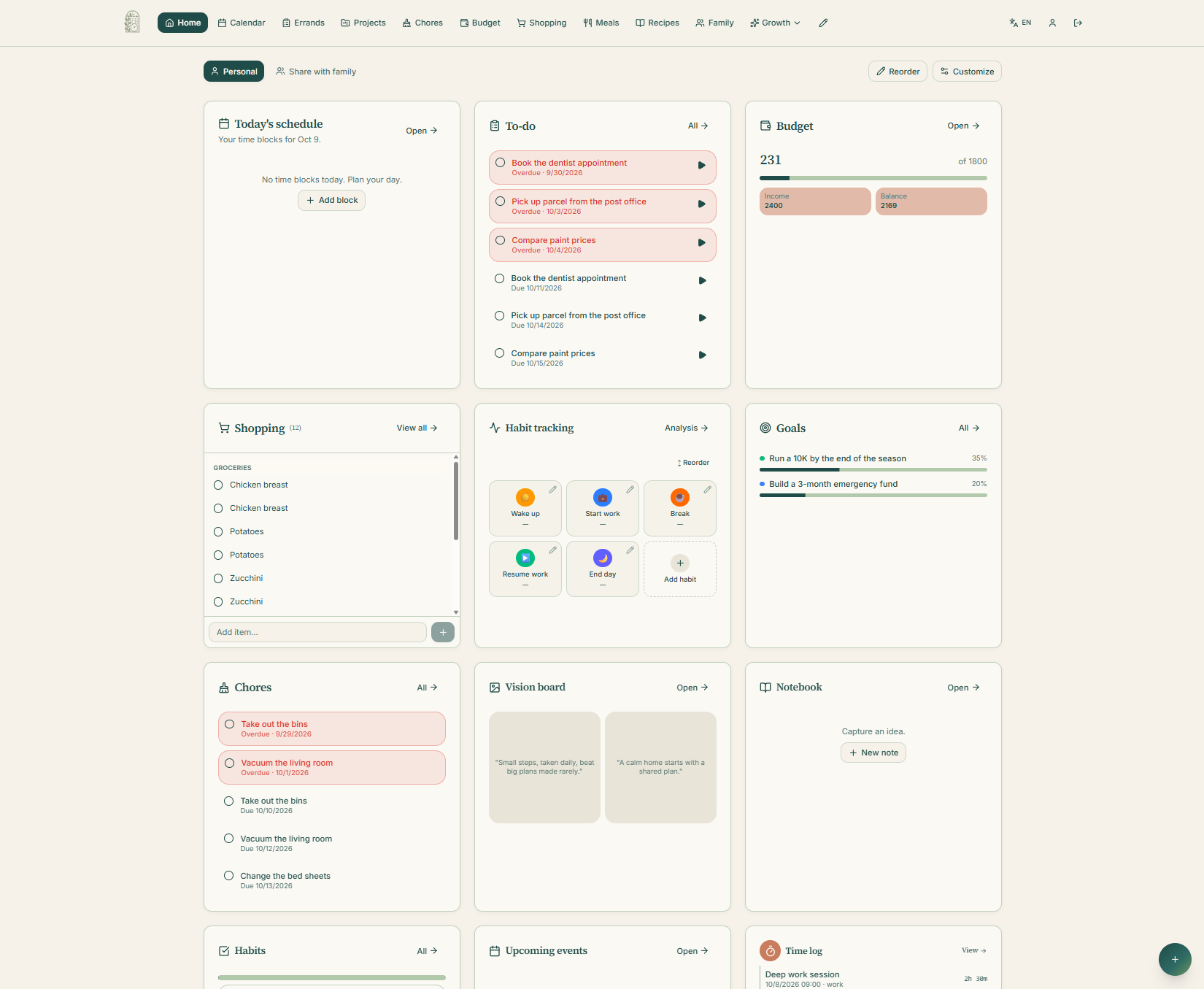
See the LifeTrellis dashboard
Schedule, tasks, shopping and budget in one view.
Which fits you best?
Choose Google Keep if…
You want simple notes and checklists with minimal setup.
Choose LifeTrellis if…
Your priority is bringing everyday household planning together, rather than managing it across separate tools.
Common questions
Does LifeTrellis replace every Google Keep feature?
No. Google Keep has its own strengths. LifeTrellis focuses on household organization; use the comparison above to decide whether that fits your needs.
Can I explore without an account?
Yes. The public demo contains sample family data and needs no account.
Can I move my Google Keep data automatically?
This page does not offer an automatic Google Keep import. Try the demo before deciding how to set up your workspace.
Find your family’s rhythm.
Try the demo before signing up.